|
Phase II Is Here — Complete Your Certifications
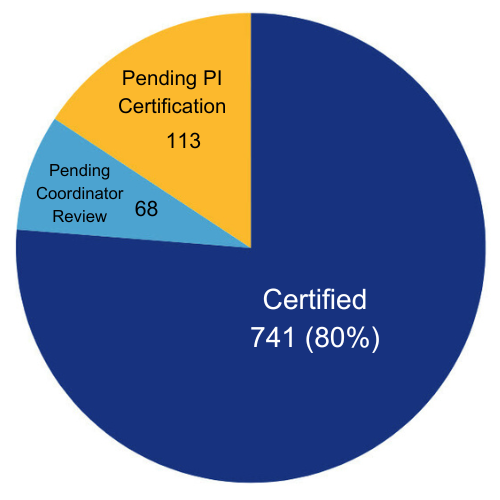
Payroll Certification remains a compliance priority. As of October 20, there are 181 certifications from the Phase I cycle (July 2023–June 2024) pending certification.
If a PI has retired or separated, email emf@ucr.edu for reassignment to the Department Chair.
The Phase II cycle (July 1, 2024 – June 30, 2025) is now available. This is an opportunity to begin certifications early and stay ahead of deadlines. |
|
|
|
|
⚠️
If there are remaining certifications from Phase I that have not been reviewed or certified, they will continue to appear with the Phase II release.
Important: Awards with certification periods extending beyond June 30, 2025 (e.g., ending August 2025) are not included in this release and will be part of a future cycle.
|
|
|---|
|
|
Reminder: Manual Non-Payroll Cost Transfers Tips
To ensure successful submission of your Manual Non-Payroll Cost Transfer (NCT) form, please follow these important tips:
✔ Submit both a signed PDF and Excel copy of the manual NCT form.
✔ Ensure all signatures are completed by the appropriate individuals, including the Preparer
Principal Investigator (PI), and Chief Financial Administrative Officer (CFAO), if applicable
— transfers over 120 days require CFAO approval!
✔ Don't forget to attach copies of the invoice(s) related to use tax corrections.
✔ Review all COAs to ensure accuracy.
✔ Include a Looker query or FTDR to support the transaction (required).
✔ Make sure all attachments are clear and concise for efficient processing.
✔ Consolidate requests by including up to 10 lines per NCT form (if possible) rather than
submitting separate forms and tickets for each request.
✔ Check the Universal Request/support ticket comments for any follow-ups from Accounting
— we may require additional details!
Important: NCT requests under $5 for non-C&G funds and under $1 for C&G funds will not be processed. Thank you for helping keep this process efficient!
|
|
|---|
|
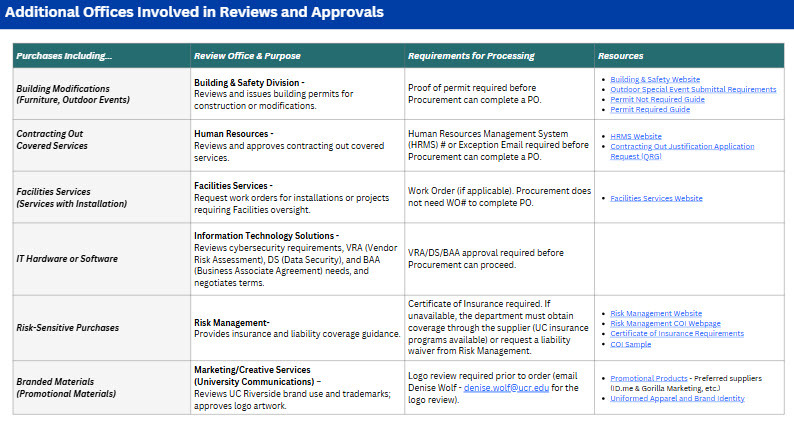
Required Reviews & Approvals
Before initiating a purchase, check whether your goods or services require special reviews, permits, or additional departmental approvals. Procurement cannot issue a purchase order until required documentation is complete.
|
|
|
|
|
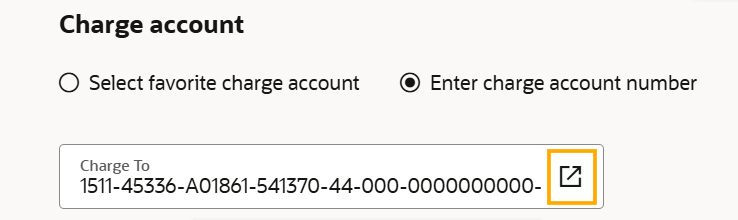
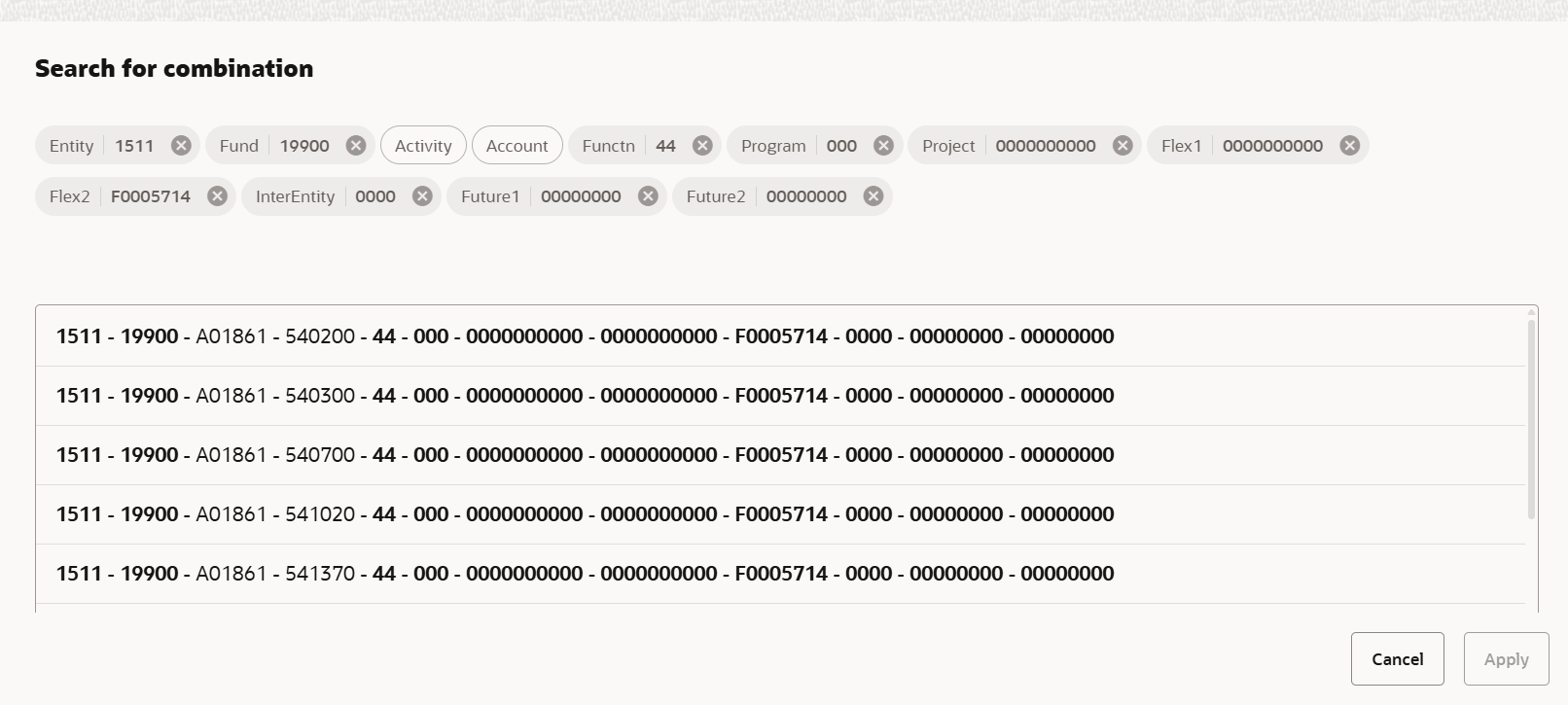
Understanding the “Search for Combination” Screen in RSSP
The Search for Combination screen only displays COA combinations that have already been used on a requisition. If a valid COA has not yet been used, it won’t appear in the results, and users will see a "No Matches Found" message. This does not mean the COA is invalid—it simply has not been used before. When this happens, enter the COA directly instead of relying on the search feature.
Key points to remember:
-
Use the search to quickly find previously used COA combinations.
-
If nothing appears, the combination may still be valid.
-
Confirm through your usual COA validation process if needed.
Training materials are being updated to reflect this clarification.
|
|
|---|
|
New: Payment Card & Restricted Items Matrix
The Card Payment Matrix and Restricted Items List have been consolidated into a single resource, Payment Card & Restricted Items Matrix, to make it easier to determine what can be purchased on PCard and T&E and when additional approvals or processes are required for a good or service, regardless of the purchasing method. The new matrix provides a clear status for each commodity (Allowed, Restricted, or Not Allowed), along with guidance on the applicable purchasing method and any required steps.
View the Payment Card & Restricted Items Matrix
This update simplifies navigation, reduces duplication, and supports compliance with UC purchasing policies. Bookmark this page for quick reference when making purchases!
|
|
|---|
|
Seat Assignments Now Visible for Southwest!
We’re excited to share an important update that will make the UCR traveler experience smoother. Post-ticketing seat assignments for flights on Southwest Airlines are now visible to our travel management partner, Anthony Travel.
To get ahead of the busy travel season, Anthony Travel has proactively assigned seats for all travelers with departures after December 31 when tickets on Southwest were purchased through Concur Travel or directly with Anthony Travel. Seat assignments were made based on each traveler’s profile preferences, ensuring a comfortable experience!
|
|
|---|
|
Updated Meal Rates Effective September 1
Effective September 1, the maximum allowable meal rates for entertainment and business meetings increased by approximately 10% in response to rising food costs.
These updated rates apply to all meals incurred on or after the effective date and are outlined in the revised Business and Finance Bulletin BUS-79.
Read the full announcement and details
|
|
|---|
|
EU Entry Requirements Change October 12
On October 12, the European Union launched the Entry/Exit System (EES), a digital border control system for non-EU nationals entering the Schengen Area for short stays. The EES will replace manual passport stamping with automated biometric checks. On their first entry, travelers will provide four fingerprints and a facial photo, which will be securely linked to their passport for future trips.The system will also |
|
|
|
|
track entry and exit dates to enforce the 90/180-day rule, which limits stays to 90 days within any 180-day period across Schengen countries.
This change applies to all non-EU travelers, including U.S. citizens, faculty, staff, and students, while EU passport holders are exempt. Travelers should expect longer wait times during initial registration and plan accordingly, especially for time-sensitive travel. Remind travelers to monitor their days in the Schengen Area to avoid overstays, which may result in fines, deportation, or travel bans of up to three years.
|
|
|---|
|
Join us for the BFS November User Group
Thursday, November 20, 1–2 p.m.
This is our final user group of the year—don’t miss key updates and Q&A.
Join via Zoom: https://ucr.zoom.us/j/94569690823
|
|
|
|
|
Web Recharge Training Guide Updates
The Web Recharge – Service Provider Update Request Forms guide has been updated, and a new Approver Guide is now available. For the full library of guides, visit Training Resources and search “Web Recharge.”
Key Reminder:
BFS frequently receives tickets requesting changes covered in the guides below. BFS does not process these updates. All Web Recharge updates and maintenance must be completed by department administrators or service providers who have an authorized Web Recharge role assigned in EACS by the department SAA.
|
|
|---|
|
Requesting a New
Service Provider |
|
|
|
|---|
|
Service Provider
Update Request Forms |
|
|
|
|---|
|
Enhancements to Come
We’re excited to share that system and process improvements are underway. Some enhancements will take time, but progress is happening!
|
|
|---|
|
|
Supplier Registration
DocuSign integrations for the “Other Non-PO” registration process has been technically completed, and guidance and training are in development!
|
|
|---|
|
|
|
Web Recharge
Mass/Batch Billing is now ready for testing, and departments will be engaged for User Acceptance Testing (UAT) soon.
|
|
|---|
|
|
|
|---|
|
| |
| |
|
| |
|
|